Configuration
The KanTickets module configuration page is accessible via the menu Home> Configuration> Modules / Applications, then click on the wheel in front of the module name.
It contains three groups of parameters:
Main params
This group contains only one parameter:

If the value of this parameter is set to “Yes”, the logos of the thirdparties and the photos of the users are displayed in the corresponding zones in the kanban cards of the tickets:
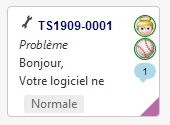
If the value of this parameter is “No”, generic icons are displayed instead of logos / photos:
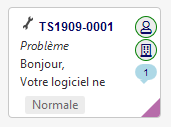
If you have a lot of tickets in Kanban views, it is recommended to set this parameter to “No” for faster loading of the page.
TAG zone parameters
The TAG area is the gray area at the bottom of the Kanban tiles.
The content of this zone can be setup, depending on the Kanban view, in the choice lists available in this parameter group:
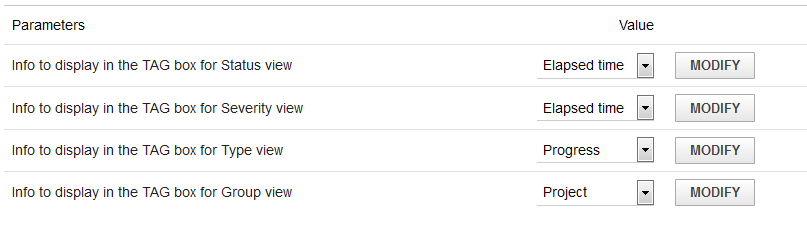
N.B .: The choices made here are displayed in the “Legend” area of Kanban views.
Colors parameters
The lower right corner of the kanban cards is colored according to the severity value of the ticket.
In this group of parameters, it is possible to choose the color of each level of severity:
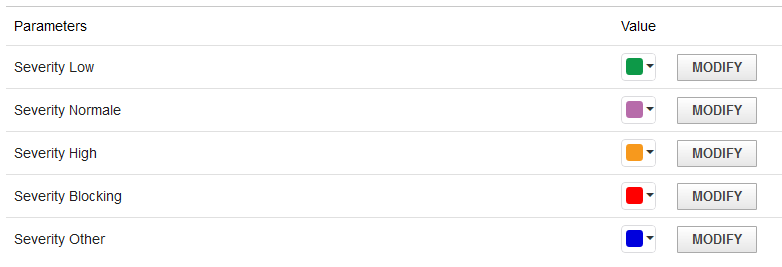
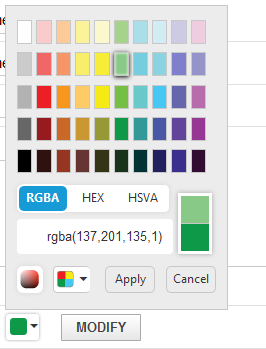
To change a color, click on the small arrow to the right of the current color.
A color picker is displayed.
Choose a color and click on Apply.
Then click on “MODIFY” to save the new color.
N.B. The colors chosen here are displayed in the “Legend” area of each Kanban view of the Tickets.